
How Do I Check Where My Business Ranks on Google Maps?

To check where your business ranks on Google Maps, search for the service a customer would use to find you, record where your business appears, and compare that position from multiple locations across the area you serve.
Checking once from your office or home gives you one ranking from one location.
A business ranks near the top close to its verified location, then disappears from the visible results when the search moves several miles away. The same business ranks well for one service and poorly for another.
That is why understanding your Google Maps visibility requires more than typing one search into your phone.
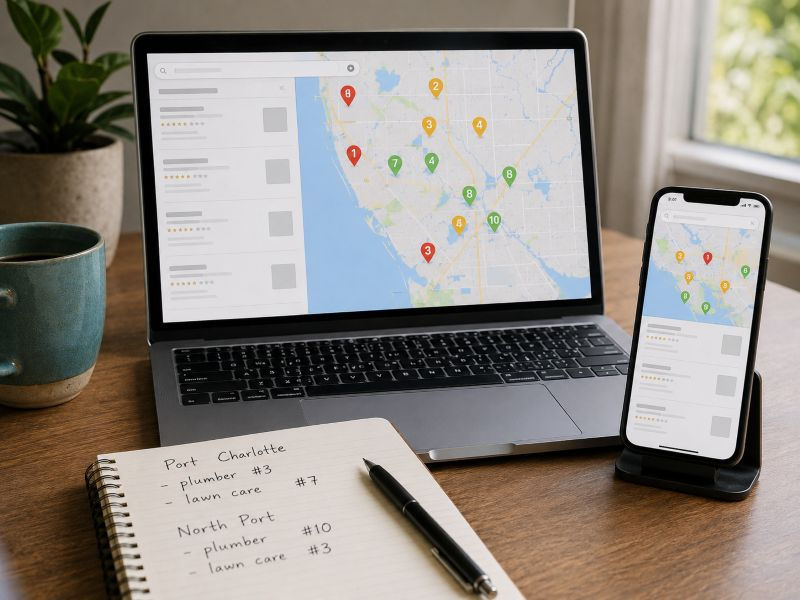
Why One Google Search Does Not Tell You Where You Rank
Suppose you own a plumbing company in Port Charlotte.
You stand inside your office and search "plumber near me."
Your company appears third.
It is tempting to say, "We rank #3 on Google Maps."
What you actually know is that your business appeared third for that search, from that location, at that moment.
Change the search term and you are measuring a different service.
Change the location and you are measuring visibility from another part of the market.
That makes a single ranking number incomplete.
Google identifies relevance, distance, and prominence as the primary factors used to determine local results.
Google's explanation of local ranking factors provides the foundation for understanding why one search does not represent an entire service area.
Ongoing Google Business Profile Management should include tracking the searches that matter to the business and comparing visibility across the areas where customers are searching.
The goal is not to find one impressive ranking number.
The goal is to understand where the business appears, for which searches, and how that visibility changes across the target area.
How to Check Your Google Maps Ranking Manually
Start with a service you want customers to find.
Do not begin by searching your business name.
Searching "Smith Plumbing" tells you whether Google returns Smith Plumbing when someone already knows which company they want.
That is different from competing for a customer searching "plumber near me" or "water heater repair."
Instead, choose one important search phrase such as:
plumber near me
septic pumping
lawn care service
air conditioning repair
roofing company
pressure washing
Search that phrase in Google Maps and record where your business appears.
Write down:
The exact search phrase
The location where the search was performed
Your position
Which businesses appeared above you
The date of the check
Then repeat the same search from another part of the area.
A Port Charlotte contractor starts near the business location, then compares that result with searches farther west, east, north, and south.
Keep the search phrase the same during each comparison.
Changing both the keyword and the location at the same time creates two different tests and makes the results harder to evaluate.
Manual checks give you a basic picture of visibility. Once you want to compare a larger area, a geographic ranking grid becomes a more practical way to organize the same type of information.
Why Adding Service Areas Does Not Expand Your Ranking Location
Service-area businesses run into another source of confusion when checking Google Maps rankings.
A contractor based in Port Charlotte lists North Port, Punta Gorda, Englewood, and Rotonda West as service areas because those are places the company serves.
Those service-area settings do not create additional verified business locations in those cities.
Google states that service-area businesses should use one profile for the central office or location associated with the business and define the geographic area where they provide services.
Google's service-area business guidelines explain how businesses set the areas where they serve customers.
The setting describes where the company operates. It does not turn each listed city into another physical business location.
That distinction matters when checking rankings.
A company serving five cities should not expect the same Google Maps position throughout all five just because those cities appear in the profile.
Why Doesn't My Business Show Up on Google Maps in Every City I Serve? goes deeper into the difference between service-area settings and actual ranking coverage.
Once you understand that distinction, the next step is measuring where the business appears across the area instead of relying on the service-area list as proof of visibility.
What Is a Google Maps Ranking Grid?
A Google Maps ranking grid checks the same search phrase from multiple geographic points across an area.
Instead of receiving one ranking from one location, you receive a map showing the business's position from a series of locations.
Imagine placing a grid across Port Charlotte.
One point sits near the business.
Another sits several miles north.
Other points cover the eastern, western, and southern parts of the city.
The same target search is checked from each point.
The finished grid gives you a geographic picture of your visibility.
Instead of saying:
"We're #4 for lawn care."
you get something more useful:
"We're strongest around central Port Charlotte, lose positions toward the eastern side of the city, and disappear from the visible results farther north."
Those statements communicate two different levels of information.
A single ranking tells you what happened at one point.
A ranking grid shows how visibility changes across the area.
That makes it easier to separate strong sections of the market from areas where the business has little Google Maps visibility.
What Should You Look for in a Ranking Grid?
The individual positions matter, but the pattern across the map tells you more.
Strong Near the Business and Weaker Farther Away
A grid showing strong rankings around the verified business location and weaker positions farther out gives you a clear picture of where visibility currently extends.
The important part is identifying the boundary.
You now know which parts of the area produce strong visibility and where rankings begin falling.
That gives you a baseline for future comparisons.
Weak Rankings Near the Business
Poor visibility close to the business deserves investigation.
The ranking grid does not identify the cause by itself.
Instead, it tells you where the problem exists.
The next review should examine the business category, listed services, website support, reviews, profile information, competitors, and the other signals connected to local search performance.
Google evaluates relevance, distance, and prominence together when determining local results.
The grid shows the outcome.
The investigation determines what needs attention.
One Service Ranks Better Than Another
A contractor ranks strongly for "gutter installation" while barely appearing for "soffit repair."
That difference matters.
Saying "we rank well on Google" hides the distinction between individual searches.
Each important service needs its own measurement.
Strong keywords show which searches currently produce the best visibility. Weak keywords show which services deserve closer investigation.
That gives the business a clearer picture of where its Google Maps presence is already competitive and where additional work needs to be evaluated.
Visibility Drops Across Most of the Grid
Comparing ranking grids over time becomes valuable when a broader decline appears.
An older grid shows strong coverage across Port Charlotte.
A newer grid shows lower positions across a large portion of the same area.
The grid proves that visibility changed.
It does not prove why.
Possible causes include stronger competitors, changes to business information, reduced visibility for the target search, or changes in other local search signals. Further investigation is needed to identify the cause.
That is different from a business that has struggled to rank from the beginning.
Why Some Businesses Stop Showing Up on Google Maps in Port Charlotte explains what to investigate when established visibility starts disappearing.
Track Google Maps Rankings Over Time
One ranking grid is a snapshot.
Repeated grids show movement.
Suppose a Port Charlotte service business checks the same keyword each month.
The first grid shows strong rankings immediately around the verified location.
The next grid shows higher positions at several surrounding points.
A later grid shows that stronger visibility now covers a larger portion of the target area.
That comparison documents progress that one search from the office would miss.
The reverse matters too.
A business remains near the top when the owner searches from the office, while the surrounding grid shows declining positions across other parts of the city.
Without consistent tracking, the owner sees the strong office result and misses the larger change.
Keep the following parts of the test consistent:
Keyword
Geographic area
Grid size
Tracking method
That makes one report easier to compare with the next.
The purpose of tracking is not reacting to every position change.
The purpose is identifying larger patterns, measuring whether visibility is expanding or shrinking, and knowing when a change deserves investigation.
Your Business Does Not Have One Google Maps Ranking
A business does not have one universal "#3 on Google" position.
Its visibility depends on the search being measured and the location where that search takes place.
That makes better questions:
Where does the business rank?
For which services?
How far does strong visibility extend?
Where does it begin weakening?
Is that coverage improving or declining over time?
Those questions turn Google Maps rankings into useful information instead of one isolated number.
Once you know where visibility is strong and where it disappears, you have a clearer starting point for deciding what deserves attention.
For Port Charlotte businesses that want ongoing help tracking rankings, maintaining their profile, managing reviews, adding photos, updating services, and improving their local presence, Lighthouse Strategic Media's Google Business Profile Management provides ongoing management focused on the searches and areas that matter to the business.



Comments